Conversational Guest Experience Demo via Messaging
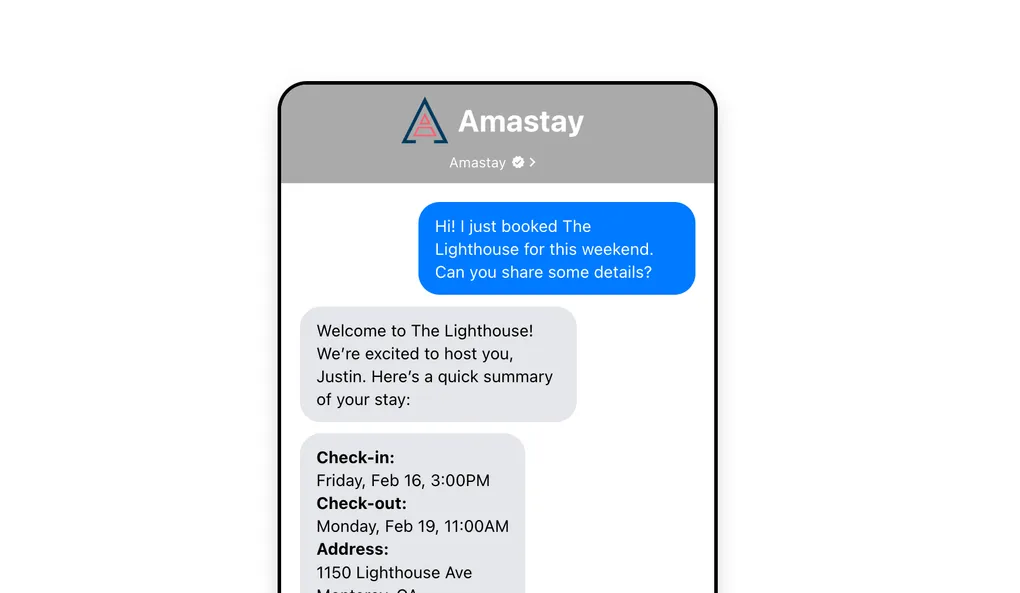
Explore how a browser-based messaging experience can simulate a full guest journey using rich UI, payments, and automation without requiring a native app.
For many digital products, the default assumption is that users need to download and navigate a full application. But in reality, most user journeys are linear, task-driven, and could be handled more efficiently through a guided interface.
That was the premise behind this demo.
We built a conversational experience that simulates how a guest could navigate an entire stay using messaging alone. Instead of opening multiple apps or interfaces, the user moves through a structured journey inside a single chat thread.
The challenge: Reducing friction in multi-step user journeys
Traditional guest experiences often require switching between multiple tools:
messaging platforms for communication
maps for directions
documents for house rules
payment systems for upsells
support channels for escalation
Each step introduces friction, context switching, and cognitive load.
The goal was to explore whether a single conversational interface could unify all of these actions into one seamless flow.
The solution: A fully guided messaging experience
We designed a browser-based demo that simulates an RCS-style business messaging environment.
Instead of static content or navigation menus, the system guides the user through a structured sequence of interactions. Messages appear with realistic timing, quick replies drive decision points, and rich components allow deeper actions without leaving the conversation.
Building workflow diagram…
User Enters Chat
Guided Messages
Quick Reply Decisions
Rich Actions<br/>Maps, Rules, Payments
Escalation or Completion
01
Structured Messaging Flow
The experience is built around a scripted conversation that simulates a real interaction between a guest, a concierge system, and a host.
The flow includes:
welcome messaging
directions and navigation
house rules access
upsell opportunities
escalation to a human
Messages are timed and sequenced to feel natural rather than automated, creating a more engaging experience.
02
Actionable Interface Components
Instead of limiting the experience to plain text, the system introduces interactive elements directly within the chat.
These include:
quick reply buttons for decision making
rich cards that open maps or internal pages
embedded flows for completing actions
contextual UI elements that respond to user input
This transforms the conversation from passive messaging into an active interface.
03
Integrated Transaction Flows
A key part of the demo is the ability to complete transactions without leaving the chat.
The system simulates:
payment flows similar to Apple Pay
wallet-style confirmations
temporary modal interactions that return to the conversation
This demonstrates how messaging can handle not just communication, but also conversion.
04
Realistic Interaction Design
To make the experience feel authentic, the system includes:
typing indicators
controlled message pacing
conditional pauses for user input
smooth UI transitions
These details are critical. Without them, the experience would feel scripted rather than conversational.
Technical approach
The demo is built using a modern frontend stack designed for flexibility and rapid iteration.
Key components include:
a message-driven architecture where each interaction is defined as a node
reusable UI components for different message types
a context system to manage timing and flow control
a browser-based container styled to mimic a real messaging client
This structure makes it easy to:
modify the conversation flow
add new scenarios
adjust pacing and interaction timing
swap out content dynamically
Why this matters for potential clients
Most businesses think about messaging as a support channel.
This approach reframes it as a primary interface.
Instead of building full applications or complex dashboards, you can guide users through high-value workflows using structured conversations. That has several advantages:
lower friction for users
faster time to interaction
reduced development complexity
more controlled user journeys
easier experimentation and iteration
For industries like hospitality, services, onboarding, and customer support, this model can significantly simplify how users interact with your product.
The outcome: A new interface paradigm
The demo shows that messaging can go far beyond simple communication.
By combining structured flows, interactive components, and embedded actions, it becomes a complete interface layer capable of handling complex user journeys.
What traditionally required multiple tools and touchpoints can now be delivered through a single, guided conversation.
The bigger opportunity
Messaging is evolving from a communication layer into an execution layer.
When designed correctly, it can replace entire categories of interfaces by guiding users step by step through exactly what they need to do.
For businesses, that means fewer barriers, more engagement, and a more direct path from intent to action.
Next read
Capacity Recovery for Recurring Home Service Teams: Cut Manual Handoffs and Clear Exception Backlog
Recurring home service teams often feel stretched even when demand looks stable on paper. A cleaning company may have a full route calendar but still lose time to schedule changes and special requests.
Necessary storage keeps the site working. With your permission, we also use analytics and Google Ads measurement to understand which campaigns lead to real conversations.Read the privacy policy.